GPT Image 2.5 infographic prompts
Verified against OpenAI documentation on 2026-09-09
An infographic is only useful if the numbers on it are yours. These GPT Image 2.5 infographic prompts hand the model the actual values, name the chart type outright, and put every axis label and legend entry inside quotation marks. The palette stays small on purpose, because a chart with four colours communicates and a chart with twelve decorates.
What makes these work
- 01
Give the model the actual numbers and let it draw them. Listing five bar values and their labels produces a chart you can check, while asking for a chart showing steady growth produces figures nobody can verify.
- 02
Name the chart type precisely. A grouped bar chart, a stacked area chart and a horizontal dot plot are three different requests, and the word chart on its own leaves the choice to the model.
- 03
Cap the palette at three or four colours and say what each one means. One accent for the highlighted series, neutral grey for everything else, and a single background tone is enough for most explanatory charts.
- 04
Put axis labels, legend entries and the title in quotation marks, and keep each to a few words. Long axis titles are where lettering starts to break down, so shorten them before you generate rather than after.
- 05
Say what the chart should not have. No 3D extrusion, no drop shadows, no gradient fills and no decorative icons keeps a data graphic readable instead of ornamental.
8 prompts
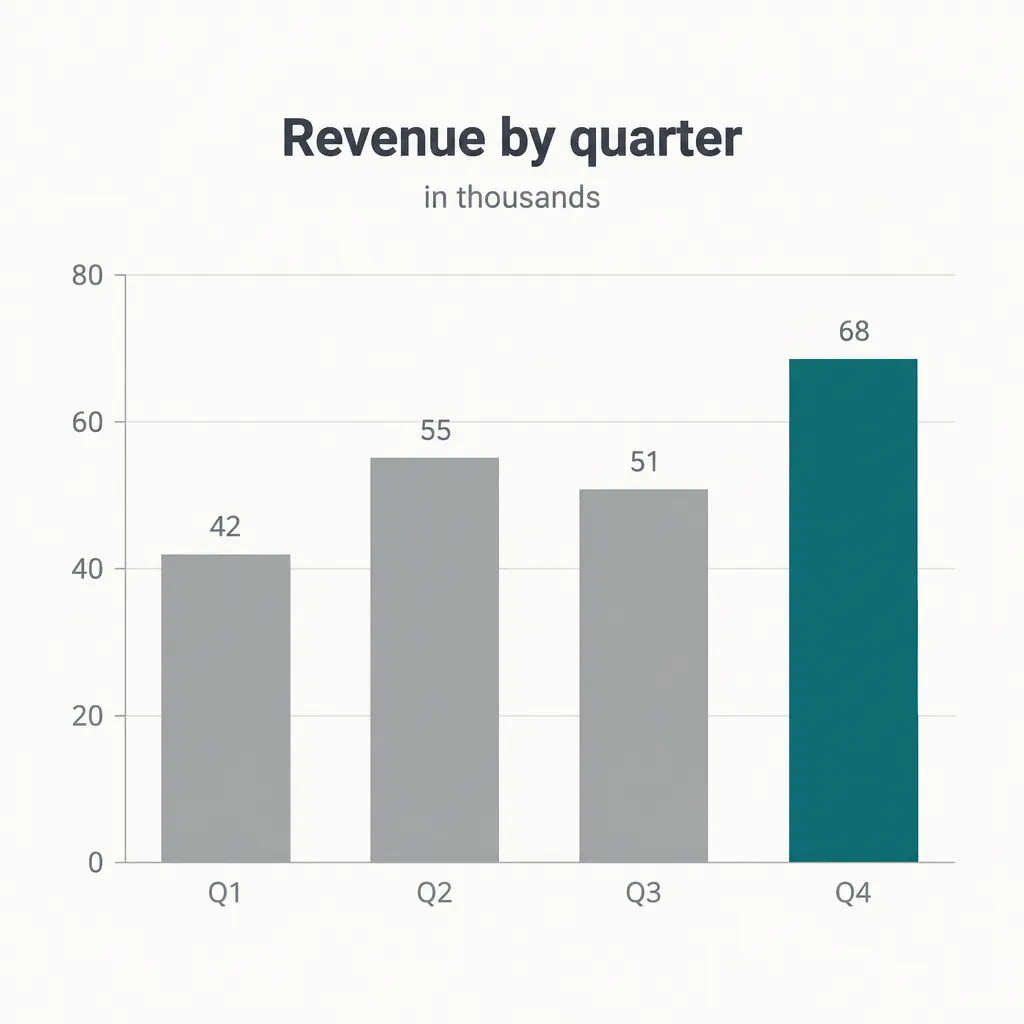
Quarterly revenue bar chart
sunburst · high · 1024x1024 · 26s
Flat vertical bar chart on an off white background, no 3D effects, no shadows, no gradients. Four bars of equal width with even gaps, using these values in order: 42, 55, 51 and 68. Bar labels below the axis read "Q1", "Q2", "Q3" and "Q4". The final bar is a deep teal and the other three are neutral grey. A light horizontal gridline sits every 20 units with small tick labels on the left. The chart title above reads "Revenue by quarter". A short line under the title reads "in thousands". Value numbers sit directly above each bar. Type is a clean grotesque, title semibold, labels regular in muted grey. Generous margins on all four sides.
Supplying four numbers means you can look at the output and see whether the bars are in proportion. Colouring only the final bar is how you point at one data point without adding an annotation.
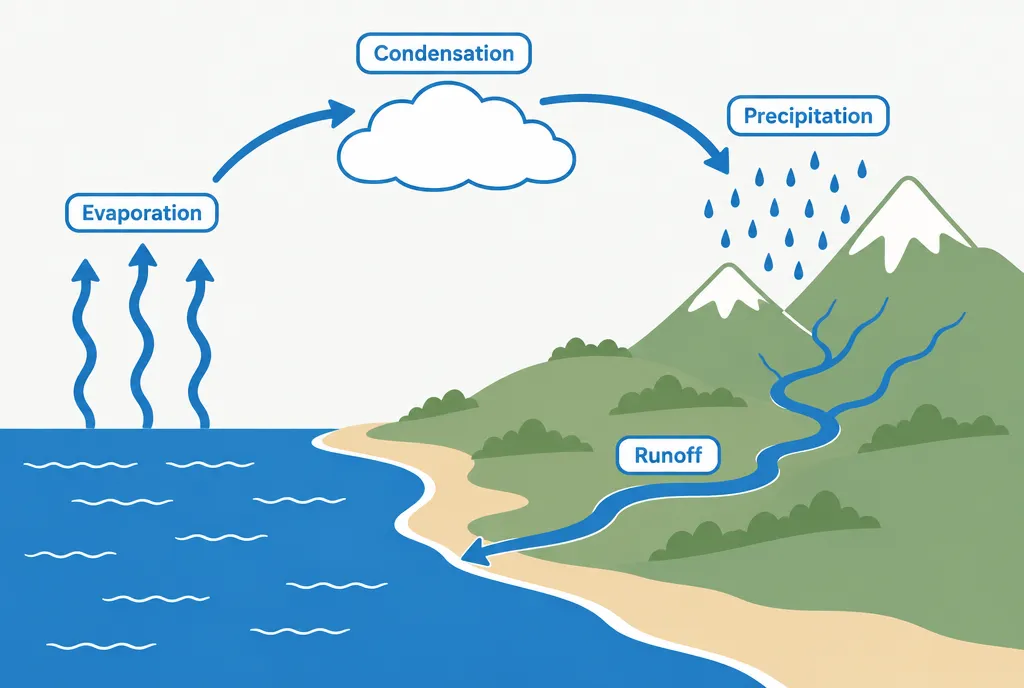
Water cycle diagram
flare · high · 1536x1024 · 27s
Educational cross section diagram of the water cycle, drawn as flat vector illustration with clean line work and no texture. The scene runs left to right: ocean on the left, coastal hills in the middle, mountains on the right, sky across the top. Curved arrows in a single blue show the loop of evaporation rising from the ocean, condensation into clouds, precipitation over the mountains and runoff returning through a river. Each stage has a short label in a small rounded box, reading "Evaporation", "Condensation", "Precipitation" and "Runoff". Palette is four colours only: ocean blue, sand, sage green and white. Arrows are consistent in weight. No characters, no sun face, no decorative clouds.
Cycle diagrams need the loop described as a sequence of positions, otherwise the arrows point at nothing in particular. Banning the cartoon sun keeps the piece in a reference register rather than a classroom poster one.
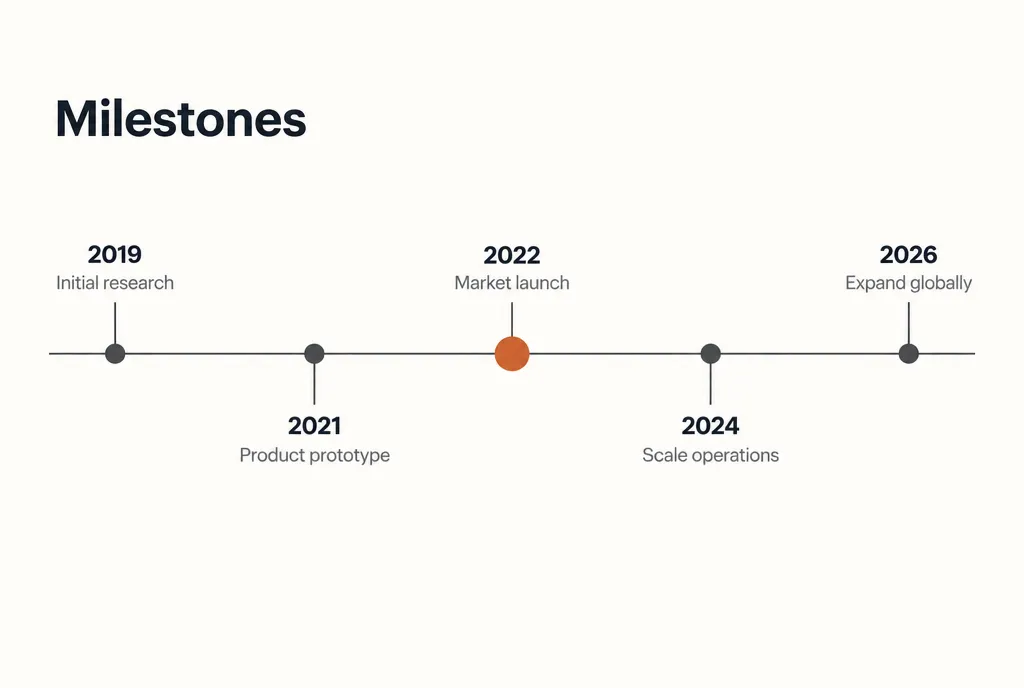
Company milestone timeline
sunburst · high · 1536x1024 · 18s
Horizontal timeline graphic on a warm white background. A single thin dark rule runs across the middle with five evenly spaced dots on it. Milestone labels alternate above and below the line, each connected by a short vertical tick. The year labels read "2019", "2021", "2022", "2024" and "2026". Under each year sits one short phrase of three or four words in muted grey. The middle dot is filled with a burnt orange accent and drawn slightly larger than the rest, which are dark grey. The title in the upper left reads "Milestones". Type is a clean grotesque with years semibold and phrases regular. Flat design, no icons, no shadows, generous whitespace above and below.
Alternating labels above and below the line is what stops a timeline from crowding at one edge. Enlarging one dot marks the pivotal moment without adding a callout box.
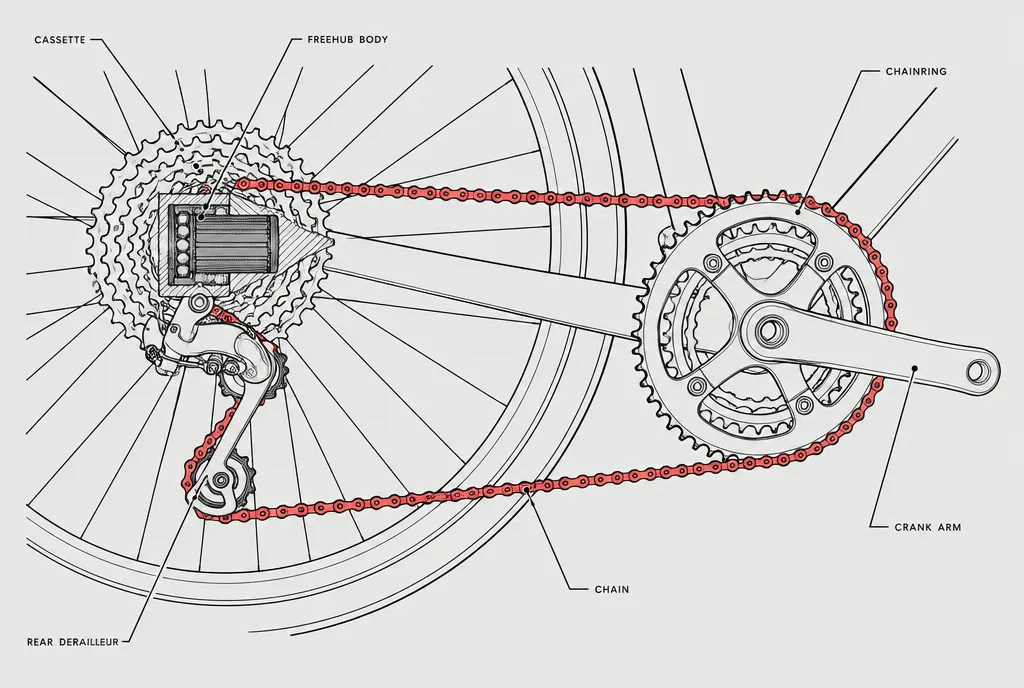
Bicycle cutaway diagram
flare · xhigh · 1536x1024 · 27s
Technical cutaway illustration of a bicycle drivetrain, drawn in the style of a service manual line drawing. Precise black line work of varying weight on a pale grey ground, with the chain, rear cassette, derailleur and crankset shown in a side view. A wedge of the rear hub is cut away to reveal the internal bearings and freehub body, with the cut surface shown in fine diagonal hatching. Six thin leader lines run outward to short labels in the margin, each reading a single component name in small capitals. Only one accent colour appears, a muted red used solely on the chain path. No perspective distortion, no shading gradients, no background scenery.
Diagonal hatching on the cut face is the drafting convention that tells a reader where the section plane is. Restricting the accent colour to the chain path traces the mechanism through a busy drawing.
Nutrition facts panel
sunburst · high · 1024x1536 · 26s
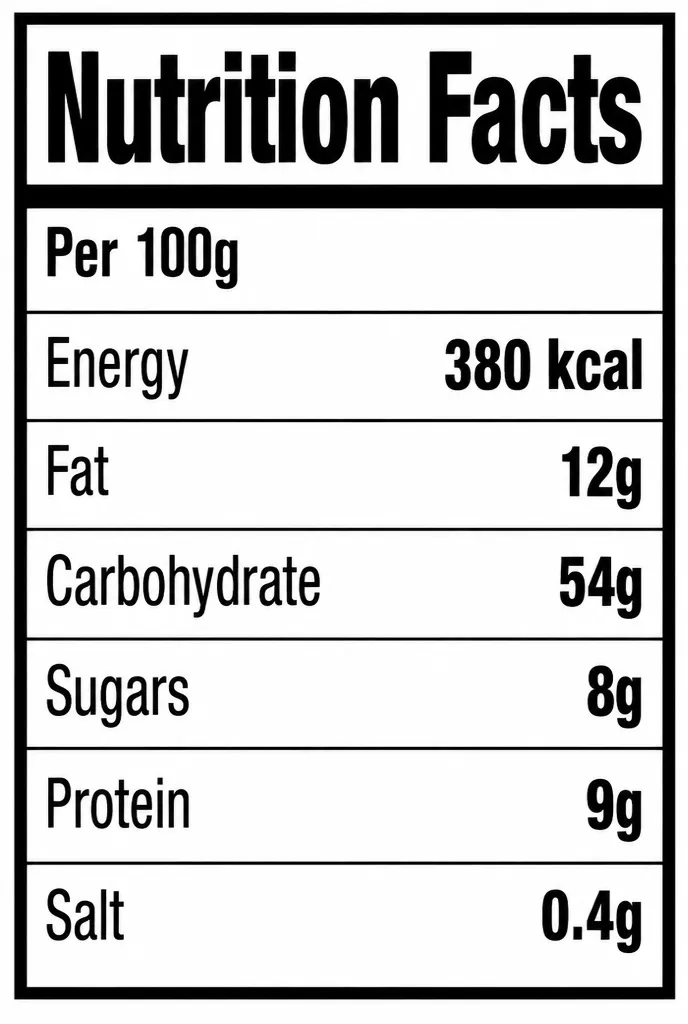
Flat nutrition facts panel printed in black on white, drawn as crisp vector with hairline and heavy rules exactly as regulatory panels use them. A heavy rule sits under the heading and a thinner rule separates each nutrient row. The heading reads "Nutrition Facts". A serving line beneath reads "Per 100g". Rows list nutrient names on the left and values on the right, with these values: energy 380 kcal, fat 12g, carbohydrate 54g, sugars 8g, protein 9g, salt 0.4g. Nutrient names are regular weight and values are semibold. A thick black border frames the whole panel. Condensed grotesque type throughout. No colour, no icons, no rounded corners.
Regulatory panels are defined by their rule weights, so naming heavy and hairline rules gets the structure right. This is dense text on purpose, which is why it goes to sunburst rather than flare.
Transit style network map
flare · xhigh · 1024x1024 · 29s
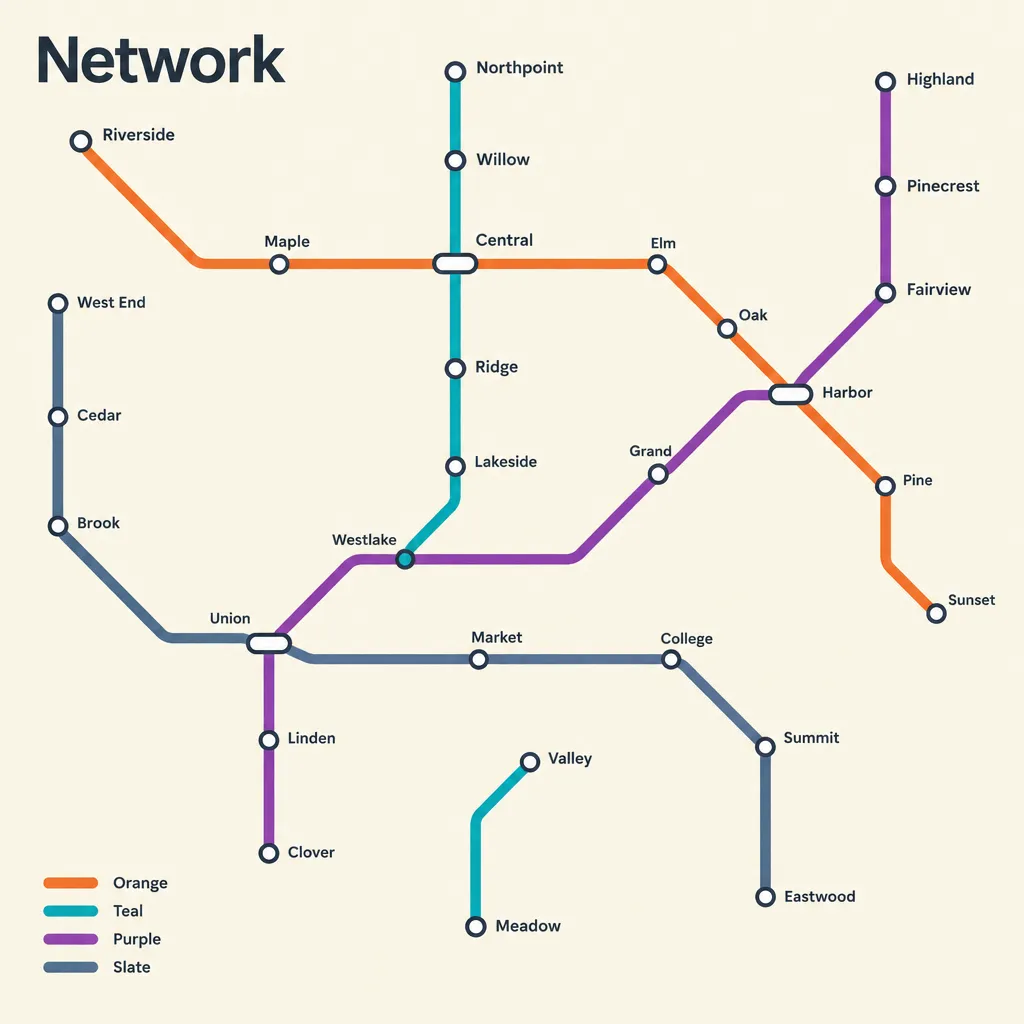
Schematic network map in the style of a transit diagram, drawn on a soft cream background. Lines run only at horizontal, vertical and 45 degree angles with consistent stroke weight and rounded corners at every bend. Four routes cross the map in orange, teal, purple and slate. Stations are small white circles with dark outlines, and interchange stations are longer capsule shapes connecting two lines. Station names sit alongside in small horizontal type, never rotated. A short legend in the lower left lists the four route colours with a one word name beside each. The title in the upper left reads "Network". No geography, no coastline, no scale bar, no decoration.
The 45 degree angle rule is the entire visual grammar of a transit map, so it belongs at the top of the prompt. Saying labels are never rotated keeps station names readable at any zoom level.
Market share donut chart
flare · medium · 1024x1024 · 26s
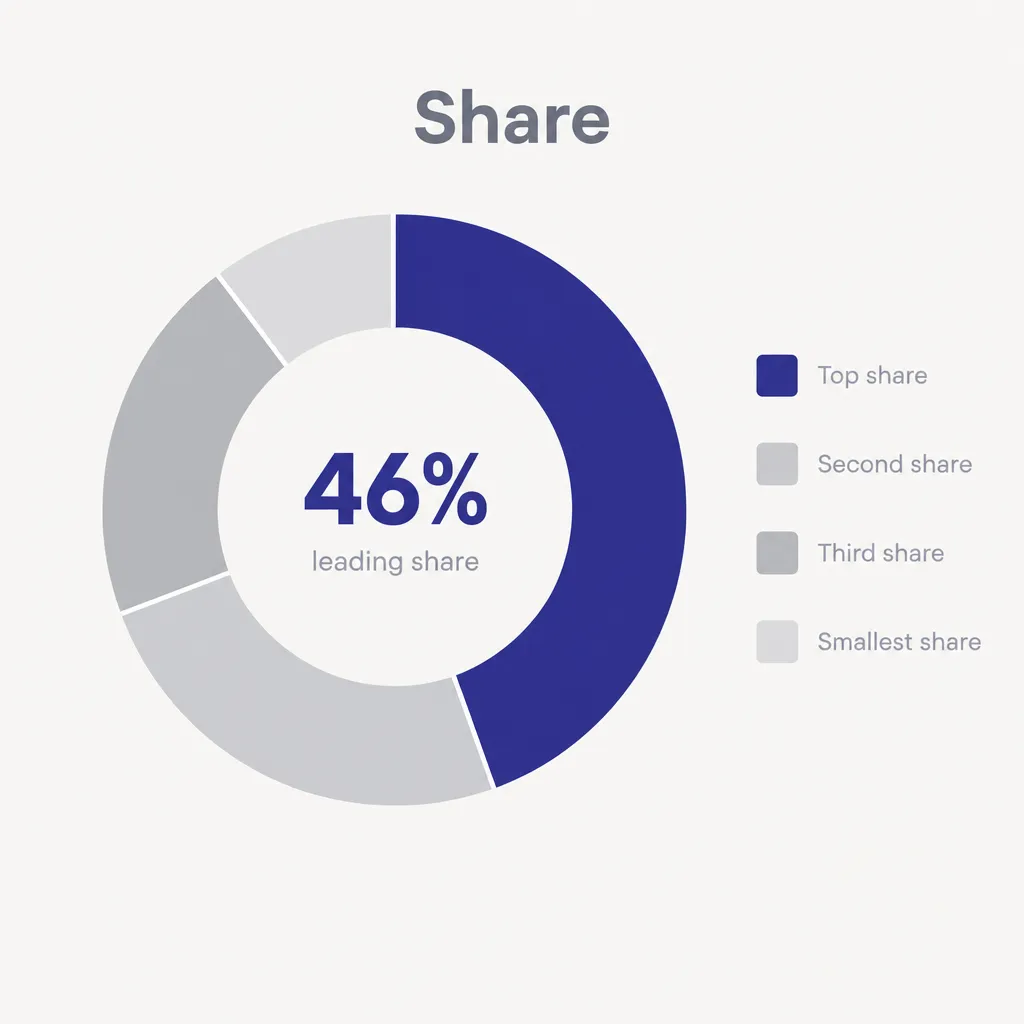
Flat donut chart centred on a light neutral background, with a thick ring and a wide empty centre. Four segments in these proportions: 46 percent, 27 percent, 18 percent and 9 percent, drawn clockwise from the top. The largest segment is a deep indigo, the rest are three steps of light grey. A thin white gap separates each segment. The centre holds a large numeral reading "46%" with a small muted line beneath reading "leading share". A legend runs down the right side as four rows, each a small colour square with a short label in muted grey. The title above the chart reads "Share". No 3D effect, no drop shadow, no exploded slices, no percentage labels on the ring.
Given percentages that sum to 100, the segment sizes can be checked against the prompt. Putting the headline figure in the hole means the chart still works when it is shrunk to thumbnail size.
Annual rainfall line chart
flare · high · 1536x1024 · 28s
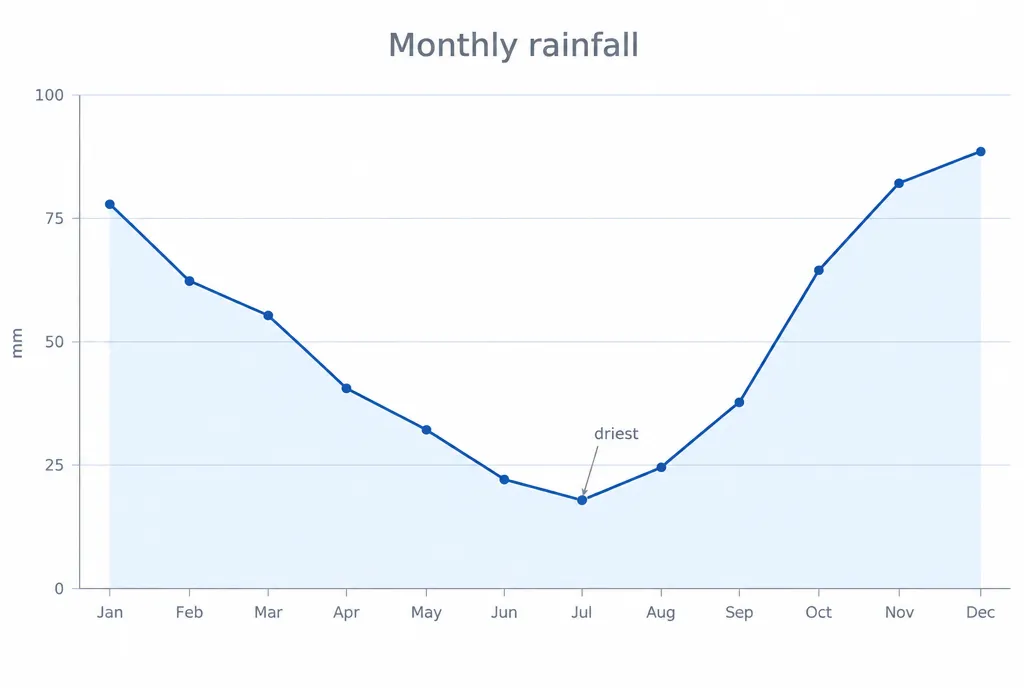
Flat line chart on a white background showing twelve monthly values: 78, 62, 55, 41, 33, 22, 18, 24, 39, 66, 84 and 91. A single dark blue line runs across with small round markers at each point and a very light blue area fill beneath it. The horizontal axis carries twelve short month abbreviations. The vertical axis runs from 0 to 100 with gridlines every 25 units and small grey tick labels. The axis title on the left reads "mm". The chart title above reads "Monthly rainfall". A small annotation with a thin leader line points at the July low and reads "driest". Type is a clean grotesque, all labels in muted grey. No legend, no shadows, no gradient beyond the flat area fill.
Twelve explicit values give the line a shape you can verify against the data rather than a plausible looking curve. One annotation with a leader line does the work that a paragraph of caption would otherwise do.
Frequently asked questions
Why should I supply the numbers myself?
Because a chart is a claim about data, and an invented one is a claim you cannot check. Listing your values in the prompt lets you compare the drawn bars or line against what you asked for, and correct anything that came out wrong. It also keeps the model from producing a smooth upward trend that happens to look convincing and means nothing.
Which model handles axis labels better?
Use gpt-image-2.5-sunburst for anything dense with text, such as nutrition panels, timelines with year labels and charts with full axis tick sets. It is the slower model tuned for exact text. Use gpt-image-2.5-flare for diagrams, cutaways and maps where labels are sparse and the drawing carries most of the meaning.
How many colours should an infographic use?
Three or four is usually plenty, and each should have a job. One accent marks the series you want people to notice, neutral greys carry the rest, and one background tone holds it together. Charts drift into decoration when every category gets its own hue, which makes the reader work out the legend before they can read the data.
Can I get exact percentages on a donut or pie chart?
Give the percentages in the prompt and make sure they sum to 100, then check the drawn segments against them. Segment angles land closer when the values are stated and the count is low. If proportions matter to the decimal, treat the generated image as a design study and rebuild the final chart in a charting tool.
What stops a diagram from looking like clip art?
Naming a drawing convention instead of a mood. Diagonal hatching on a cut face, consistent leader line weights, labels set horizontally and no perspective distortion are all things a technical illustrator does deliberately. Adding a short list of exclusions, such as no icons and no gradient fills, removes the decoration the model would otherwise add.